Sunday, 27 August 2017

Close the curtains : IT Class And Course Assessments

                 ๐Ÿ˜ Assalamualaikum And Hello Beautiful Girls And Lovely Boys ๐Ÿ˜


Here we are again. So, this is the last week of  IT class for this semester. We had come to the end of the semester. I felt so sad to say that this is the last entry for this blog. There is goodbye in every hello. However, I did not think that this knowledge that I gained in learning this subject would ever fade.

This subject has taught me lots of things that are so useful to me in the future. I learned how to use Podcasts, creating PowToon for educational purpose and I also learned how to create a Smartbuilder courseware. It also helped me to improve my creativity and encourage me to use Canva. 

I believed that this class is not the end for me. What I gained and learned from this class had actually opened a wide door for me to explore many great things. I felt grateful for every single knowledge that I learned along the way. Yes, I might not be the greatest student in using and knowing every IT features but I am still learning. That is the most important things in life. Learn from your mistakes and open your heart and soul to learn new things. Maybe, something very great and huge are waiting for you but you do not see that because you are demotivated by something that is not working for you. Do not let that happen. Always stay positive and seek help.

In conclusion, I would like to thank Madam Azidatunnoor for all of her kindness, efforts and guidance in helping us throughout our semester. I would also like to thank my friends and my group mates for all those encouragements and helps to complete all the tasks that given to us. I really appreciate all of their supports in helping me. With these knowledge and guideline that I have gained so far, I hope that it can be useful not only for me to use but I can use it to help other people too.


That is all from me.๐Ÿ’๐Ÿ˜Ž๐Ÿ˜ƒ Please forgive me for whatever things that I have done.๐Ÿ˜„

Until then, be safe and take care people ๐Ÿ’ž๐Ÿ’–

Everything Is Tested: Smartbuilder and IT Test

           ๐Ÿ˜ Assalamualaikum And Hello Beautiful Girls And Lovely Boys ๐Ÿ˜

In this entry, it is going to come to the end. Why? This is because this week is our final week.๐Ÿ˜ญ So, it means that this week is the submission week for our Smartbuilder courseware project. Not to forget, we also had our IT test. 

I felt relieved after finished answering my test. This was because several nights before the test, I had to balance my time between studying for IT test and finishing other assignments. So, I actually did not have enough sleep but I was determined to study for this test. 


My group had finished all of our parts. There were many obstacles in doing this project. However, I was so glad and grateful that my group mates and I worked as a team. We helped each other out along our journey in creating our Smartbuilder courseware project. Our teamwork was great. I felt happy working with my group mates because we did not downgraded people even if they are weak in doing the courseware. We worked as a team. That was the most important thing that we did. Never neglect people who are weak. Hence, we tried to help each other out.

Sometimes, the buttons and pages did not direct to what we wanted. We tried to discuss and work it out. The most frustrating moment was when we wanted to publish our courseware but some parts of it goes missing and did not follow exactly what we wanted it to be. We did not gave up. I think that was the best journey and lesson that I have learned while doing our smartbuilder. 


Here is the link to our courseware project : OCCUPATION

Overall, everything is tested this week. Before submit our Smartbuilder Courseware and report, we tried to do a final touch up. We tried to test the courseware if it is working or not. We also made some adjustments to make everything standardize.


That is all from me. ๐Ÿ’–
Until then, be safe and take care people. ๐Ÿ’ž


Friday, 25 August 2017

SMARTBUILDER BEHIND THE SCENE: FIRST TRAILER

                  ๐Ÿ˜ Assalamualaikum And Hello Beautiful Girls And Lovely Boys ๐Ÿ˜


In this entry, I am going to share about the trailer and preview of Smartbuilder. ๐Ÿ˜„ Sounds exciting!Right?
Based from what I have learned, Smartbuilder is a software that helps you in making an interactive courseware. From my perspective, I can relate how Smartbuilder can help us in not only learning the language but also in teaching the language. Thus, I think Smartbuilder is related to what I have learnt before which was about CALL. Smartbuilder acts as a supplementary to education. It is the ultimate of teaching aid because it makes the students to learn without the presence of a teacher.


Before we go deeper with Smartbuilder, here are the preview of what I have learnt. The beginning of my Smartbuilder trailer started with the features of Smartbuilder, the properties of it, pages and what you should do or not do during making the Smartbuilder.


I am grateful during this class. This is because I learned about how we can have a picture without background. You know sometimes, we do not want the background of the picture. We just wanted the main image in the picture. So, we can crop the only main image that we wanted. 

You can try this out when you go to:
The reason why we learned about this is because we might use this to put our selected images in the Smartbuilder.


My experienced in doing Smartbuilder was quite a journey.๐Ÿ˜… I understand the features and how to use it. At that time, when I was very busy to catch up during the lesson, my Smartbuilder crashed and hang suddenly. Not only that, the instructed features was different. So, that was quite challenging for me when I was doing my Smartbuilder.


However, I am glad that I did not give up. I slowly began to know the right command when I wanted to instruct the features in Smartbuilder. With the guidance from my lecturer and also my friends, I began to improve my application skill in doing this.


I hope with this knowledge, my group mates and I will be able to create Smartbuilder courseware easily and give benefits to the students.

This is my trailer and preview of Smartbuilder.

Do not hesitate to ask if you have any questions. Feel free to give a comment, okay. ๐Ÿ˜Ž

Wait for my next entry.๐Ÿ’– Until then, be safe and take care people.๐Ÿ’ž


Saturday, 19 August 2017

AN INFO GRAPHIC DESIGNER BY USING CANVA

               ๐Ÿ˜ Assalamualaikum And Hello Beautiful Girls And Lovely Boys ๐Ÿ˜
In this entry, I am going to share to you my experience of becoming an info graphic designer by just using Canva. I have a little bit of background knowledge using Canva as I have been using Canva to create some posters before. 

Let's talk about Canva! ๐Ÿ’–

Canva is the place where we could design anything. It is a free graphic-design tool website. We could design things like resume, postcard, magazine cover and banner. Canva is a tool loaded with an easy features to use and functionality that anyone can create a variety of engaging content that gets shared. So, as you can see, it is very easy we use Canva when we wanted to design something.


As I have said before I have created some posters using Canva but I have never had to use Canva to create and an Info graphic. So, when I was being told to design an informational chart, Wow!


I have never design an informational chart before. It took me sometimes to come up with the ideas of what information should I put and how to fit the information together in my Canva. During class, I did not finished my Canva at that time. So, I continued my Canva at home. I felt a little bit frustrated when I had finished my designed and suddenly my internet line was being terminated. The internet connection was out before I could save my Canva design.


That was my huge obstacle in creating my first Info graphic design by using Canva. However, I did not give up. So, remember to have a good internet connection when you wanted to use Canva and never give up in designing Info graphic or in whatever designs you wanted to do. You never know the joy of creating it until you have done your own design.

Here, I have designed and attached my own Info graphic using Canva. ๐Ÿ˜„


Overall, I have learnt lots of things in when I became an Info graphic designer by using Canva. I learned about some of the useful information when I did my Info graphic chart. I also experienced how to be creative in putting the words, pictures and features in appropriate manner by using Canva. Keep your design simple and nice. Do not give up when creating your Canva design.๐Ÿ’• It is because that Canva is your own design and it is up to your own creativity. Lastly, I realized having a good internet connection while using Canva is a must.๐Ÿ˜

Do not hesitate to ask me if you have any questions.
Feel free to give a comment, okay. ๐Ÿ˜Ž

Wait for my next entry. Until then, be safe and take care people. ๐Ÿ’ž


Monday, 24 July 2017

MY JOURNEY IN CREATING A POWTOON

                            ๐Ÿ˜Assalammualaikum and hello beautiful girls and handsome boys๐Ÿ˜

This whole week, I learnt about how to use PowToon. I would say that this week, I am becoming more better in using PowToon application. This is because I explore lots of things that I never dream of either using or learning it. It was a great experienced as my adrenaline rush in excitement with full of satisfaction during my journey in creating a Powtoon.
When I reflected back of what I felt during my journey in creating a PowToon, I felt like a mix of candies with different flavours tight up together in a box. There were lots of emotions, flavours and the taste of making a PowToon that could not be described as 'done and submit' only. It is more than than that.
My lecturer required us to do PowToon in a group of three. I felt grateful in learning how to create PowToon. It helped me to explore certain features in PowToon. I learned how to add animations using pictures and how to make the text moving. In terms of interpersonal skill, PowToon helped me to develop the spirit of teamwork and helping each other. I believed that most of us in the class have learned valuable lesson during our time in creating the PowToon.
Creating this Powtoon had helped me to become a better person. It helps me to be brave and creative. Using power point is common that it seems a piece of cake for most of us. However,using PowToon as your educational aid seems like taking your time in creating it. Although PowToon had challenge me to push me beyond my comfort zone, it taught me to be more creative and how using PowToon can enhanced my imagination to create something that is more attractive, interactive and entertaining.


Feel free to watch our PowToon.

That is all my journey in creating a PowToon.
Do not hesitate to give comments, okay๐Ÿ˜Ž
Wait for my next entry.
Until then, be safe and take care people. ๐Ÿ’–๐Ÿ’—

Saturday, 15 July 2017

USING POWTOON AS AN EDUCATIONAL VIDEO

                    ๐Ÿ˜ Assalamualaikum and hello beautiful girls and lovely boys. ๐Ÿ˜


Have you ever heard about PowToon? Do you ever used PowToon before? Honestly, I have heard about PowToon and I have watched some of my friends used PowToon as their teaching aids during my diploma. Well, I have never used PowToon before and I am grateful that I have learnt PowToon during my class last week.


Based from my own understanding, PowToon is a Web-based animation software that allows the users to create animated presentations by manipulating the objects, pictures and also this animation can be enhanced with interesting music or using our own recorded voices. 

PowToon can be quite useful in education. It helps the teacher to make the learning becomes more exciting.  Not only in education, PowToon can be used in language. It is an interactive medium where you get the chance to listen to the pronunciation of the authors. You can either improved your own pronunciation to become better or you can also learn about other people slang using PowToon.

Yes, I think students would love to use PowToon as their learning materials because it involves lots of creativity, excitement and colourful animations. When my lecturer asked me to create PowToon for an educational video, I feel thrilled. This is because I feel that learning PowToon  is a totally new experience for me. Yes, it can be quite challenging for beginner like me but it does not stop me from learning this new lesson. I would love to share my PowToon work with others or especially to students (if I teach students later on) because human learns better in animation rather than rote of memorization or using chalk and black board.

Hence, I would encourage all of you to use PowToon especially as an educational video. Let us make our education and language learning becomes exciting and interesting, okay ๐Ÿ˜„๐Ÿ™†

Feel free to click here to watch our PowToon
PowToon: Idioms
OR
just click here:


That is all for this entry. ๐Ÿ˜Ž If you have any questions, please do not hesitate to ask me. ๐Ÿ˜„
Wait for my next entry. ๐Ÿ˜
Until then, be safe and take care people. ๐Ÿ’–


USING PODCASTS AND DIGITAL STORYTELLING FOR LANGUAGE LEARNING

                          ๐Ÿ˜ Assalamualaikum and hello beautiful girls and lovely boys. ๐Ÿ˜
Have you ever heard about podcasts? Have you ever use podcasts before? Honestly, I have never heard about the term podcasts. Well, actually after this lesson, I realized that I had been using podcasts during my diploma. It's just that I do not know that it is called podcasts. ๐Ÿ˜… Thus, I would like to share my reflection to all of you about Podcasts and Digital Storytelling in Language Learning.
Podcasts involves audio or video that can be played and downloaded through internet connection. It can be downloaded to a computer or mobile device such as MP3 player. Actually, the term 'podcast' comes from iPod (Apple Portable MP3 player) and broadcast. Podcasts is not limited to music but in fact, it offers a whole dimension of world and topics from storytelling to tutorial to lesson or talks. My lecturer said that his husband who happens to be my lecturer loves to listen to historical and literature using Podcasts. ๐Ÿ˜

Do you know that we can use Podcasting in our language teaching? There are two main uses of Podcasting in language teaching.
1. Students can listen to existing Podcast: Listening to Podcast not necessarily to listen about the tutorials or the lesson but it is also being use in the test. For example, in listening test (MUET) or Listening and Speaking subject (I have taken this subject before), it required me to listen to the audio that are being played. 
2. Students can create their own Podcast: Listening to Podcast is not enough. When it comes to language teaching, we need to create our own Podcast to know how it actually works and also it is better to use our own voice with an additional sound effects. This is because we can add and utilize our own creativity in teaching the language.


Podcasts can be applied in our daily life either in academic or non academic. It can served lots of purposes and also it comes with variety of topics and levels that are suitable for everyone. Podcasts can be used for our own self study. We can use Podcasts to listen for a language learning purpose. 

Not only to sharpen our listening, Podcasts also helps to improve our reading skill. Imagine, we need to finish reading a book with 1000 of pages. Well, we do not have to worry anymore. This is because Podcasts offer us the opportunity for the book to be read to us instead of we read the book. So, what are you waiting for? You can directly search for any Podcasts that you want to listen to, downloaded it and have it played anytime and anywhere you like. Easy, right? ๐Ÿ˜œ๐Ÿ™Œ

Let me share to you how you can use Podcasts. Firstly, you might need an audio or recording tools, online voice recorder or a smartphone to record your voices or search for any additional sound effects. Then, of course you need some editing tools to combine, edit or mix the sounds. So, you need an audio editing tools like audacity (click here) or any online audio editor to make the sound becomes nice to hear. ๐Ÿ˜œ

Remember, do not forget to upload your Podcasts otherwise how can we listen to your work, right? ๐Ÿ˜‰
The most favorite podcasts medium that people use it to upload their work are Youtube, iTunes, SoundCloud and Blogs. 

Feel free to listen and view my podcast okay. ๐Ÿ’ž


That is all for this entry. ๐Ÿ˜Ž 
If you have any questions, feel free to ask me ๐Ÿ˜„
Wait for my next entry. ๐Ÿ˜
Until then, be safe and take care people. ๐Ÿ’–


Instructional Courseware Design

                      ๐Ÿ˜ Assalamualaikum and hello beautiful girls and lovely boys ๐Ÿ˜


Have you ever heard about Instructional Courseware Design (ICD)? If you have never heard about Instructional Courseware Design (ICD), you can keep on scrolling down to read more about it.๐Ÿ‘€


In this entry, I am going to talk about my reflection on the topic Instructional Courseware Design (ICD). ICD is a process of creating and developing instructional courses or materials that makes it efficient, appeal and effective to the learners who wants to acquire the skills and knowledge.

 Based from my discussion during class, I have learnt that ICD is suitable for people who are interested in designing the course. They use Instructional Design based on what is being instructed. For example, at the back of your revision book, you can find a CD. It consists on the topics that you are going to learn. As for teachers or educators, they can apply Instructional Courseware Design in their lesson plans to make it more attractive.

Hence, in order to design and create an instructional experience, it is a necessary for teachers or educators to figure out the needs of the learners, define the learning objectives and create some intervention for learners to achieve the objectives

ICD is a mix of Behaviourist and Constructivist learning theory. Here are the things that I have learnt and understand about Behaviourist and Constructivist learning theory.

Behaviourist learning theory: It deals on learners' behavior towards the given stimulus. It is related to how the teachers make their students behave. I am going to give you the simplest example in order for you to understand how this theory work. 

1. Dog and bell:  Do you know that dogs are attracted to bell? If the owners want to control or grab their dogs' attention, some of them will ring a bell. When dogs hear a bell, they would straight away control their behavior.

2. Hamster and food:  Back then, I had two hamsters. Sometimes, my hamsters did not followed my instructions. So, instead of just putting their foods and waiting for them to eat while they made some messed in their cage, I changed my strategy. I took their food and try to play the food with them. Strange thing happened when they instantly reacted and behaved according to my hand's direction. By then, I knew that I had applied the behaviouristic learning theory with my hamsters. ๐Ÿ˜‚๐Ÿ˜‚

Constructivist learning theory: The learners build their knowledge on specific subjects based upon their prior knowledge. It is an active learning process where the students initiate the action and execute the learning process while the teacher is just a facilitator.

Picture A: The traditional method in teaching and learning
Picture B: Constructivism learning takes place. 

Learners Needs
It refers to what the learners want to get out of the education and the learner's current skill and knowlege. These are the few things that I understand during my class. Needs analysis have to be done to ensure the effectiveness of learning takes place. Hence, syllabus, survey, free writing and public records are things that needed in analysis. We need syllabus to know the students level while we need to do survey to know our students background such as their knowledge, gender and age. We can give a free writing to the students like giving them freedom to write anything so that we can get to know their writing style. Public records are needed to record the information from the analysis that we had carried out.

Instructional Design (ISD) 
Instructional Design (ISD)  involves creation of syllabus (done by content expert), planning of lessons,material selection and adaptation (from where the sources or information are taken) as well as planing the implementation to instruct learners in designated lessons. ISD requires learners' needs and learning outcomes to ensure unified objectives could be achieved at the end of the lesson.


Instructional Design In CALL
From what I have learnt in CALL, ISD is used to help in creating computer courseware for learning. However, it is important to remember that the courseware acts only as supplement to the lesson, not complete replacement of teachers or lessons in class. This courseware can be designed for use inside and outside of lesson.

PLATO
PLATO being used by the student

PLATO refers to Programmed Logic For Automated Teaching Operations. Historically, PLATO (1960-2006) is the first computer assisted instruction system that can be programmed to teach any course even though it is expensive.

ADDIE MODEL
Based from my own understanding, I believe that course design is a cyclical process. The most well-known model is referred  to by its acronym: ADDIE. Here are the things that I have learnt about ADDIE MODEL.
A (Analysis): We need to identify learners' needs and learning outcome.
D (Design):  We need to outline instructions for activities and assessments in the courseware based on learners' needs and learning outcomes.
D (Development): We start to create and assemble the content based on the outline in designing phase.
I (Implementation): The procedure for learners and facilitators to use the courseware is developed.
E (Evaluation): We evaluate the impact of courseware  through formative and summative evaluation.
ADDIE is a framework for the developmental of instructional coursework.

Conclusion
Overall, ICD is related with ISD as it depends heavily on the learners' needs and learning outcome. In order to design a courseware properly, I would suggest that we use ADDIE model to framework our work from the beginning until the end. In terms of formative evaluation, it is very effective, useful and relevant whereas in terms of summative evaluation, it seems that the effectiveness of the courseware can be viewed as a whole. Hence, in this topic I have learnt how I can apply and implement ADDIE model to design my own courseware.

That is all for this entry.๐Ÿ˜Ž If you have any questions, feel free to ask me.๐Ÿ˜๐Ÿ˜„
Until then, take care and be safe people.๐Ÿ˜๐Ÿ’–
Wait for my next entry, okay๐Ÿ˜„

Wednesday, 12 July 2017

Computer Mediated Communication (CMC) And ESL

                           ๐Ÿ˜ Assalamualaikum and hello beautiful girls and lovely boys ๐Ÿ˜

In this entry, I am going to share with you about what I have learnt in my class which is Computer Mediated Communication (CMC) and ESL.

Computer Mediated Communication (CMC)
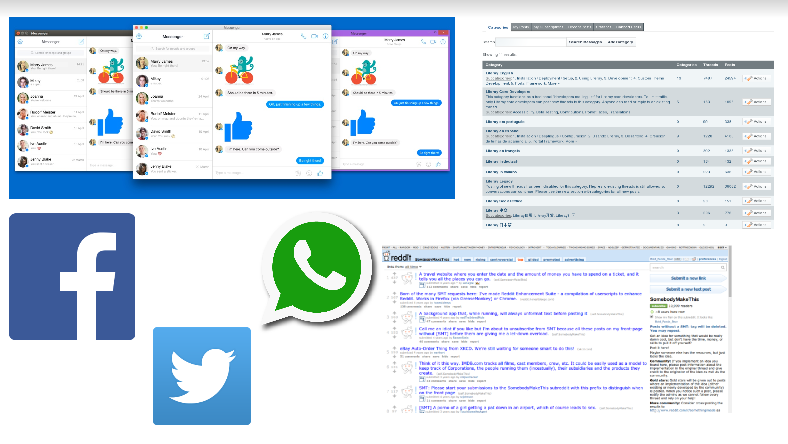
I have learnt that Computer Mediated Communication (CMC)  term for interaction or communication between people via separate computer through network connection. It is any communication patterns mediated through a computer. As long as we have internet, we can communicate with others using WhatsApp, Facebook,Twitter and others.
     Features of CMC

CMC In Education
CMC has been adapted and used in education starting 1980's to 1990's. It becomes widespread with the use of Emails and forums. It is implemented for a long distance teaching and/or learning. From my understanding, CMC is a relevant way in education nowadays. This is because it allows us to communicate with each other anytime and anywhere.

Types of CMC
As I mentioned in my previous entry, I have learnt  that there are two forms or types of CMC. Here are the things that I understand about the types of forms in CMC:
Asynchronous is a delayed form of communication. For examples are like e-mail, forum, message boards and others. On the other hand, synchronous  is a direct form of communication where you would probably get an immediate reply or feedback. For examples are like Wechat, WhatsApp  an Twitter. 
  Asynchronous
Synchronous 


CMC And Long Distance Learning
In the late 2000, CMC was implemented for distance learning. It allows the teacher and the learners to interact without having problems even though they are not in the same situation. I have experienced this situation. I have some questions related to study that I want to ask someone who lives very far from me. Thus, I used WhatsApp as a medium to communicate with that person. My friend also takes a picture of what is wrong and suggested a few of right answers during the time I learned with her. It is easy when I get a reply with feedback from her without I have to waste my money to travel just to meet her.

Conclusion
I have learnt that CMC has brought an impact to education, language and the lifestyle of people around the world. It allows us to communicate in a distance which can be quite useful for learning and language purposes. Although it benefits us a lot but I could not denied that it also have its own negative sides of it. Sometimes, I see there is a misunderstanding message between my friends. As a matter of facts, I have experienced people understood my message. This probably because using WhatsApp message, it could not read the minds of the author or author's emotion. Hence, people will interpret it in their own way.  So, let's us be clear in whatever the things that we want to communicate using CMC.


That is all from me.๐Ÿ˜Ž If you have any questions, feel free to ask me.๐Ÿ˜ƒ
Wait for my next entry. ๐Ÿ˜
Until then, be safe and take care people.๐Ÿ’–

SEARCH ENGINES: SEARCH ENGINES AND ONLINE DATABASE

                                ๐Ÿ˜ Assalamualaikum and hello beautiful girls and lovely boys ๐Ÿ˜


During my class, my lecturer asked us which search engine that we usually use. Majority of us said that we prefer to use Google rather than Mozilla Firefox, Yahoo, Bing and others. In my opinion, I use Google because Google is much more simple, easy and user friendly. I strongly agree that Google is faster compared to other Search Engines.
๐Ÿ˜’๐Ÿ˜’๐Ÿ˜’๐Ÿ˜’๐Ÿ˜’๐Ÿ˜’๐Ÿ˜’

With the advance of technology, information can becomes easily accessed through the usage of Search Engines such as Google,Yahoo and Bing. Based from my understanding, Search Engines is like a library with full of books, information, knowledge and everything that you want to know just by typing the keywords. Basically, Search Engines is a web tool that allows users to enter keywords and find information on websites contained in its database. 

There are four parts of Search Engines: Database to store reference to webpages, web-crawlers to find and compile indexes of Web Pages, user interface and Information Retrieval System.

Other than, I have learned that there are Specialized Search Engines for a specific area. These are the examples of Specialized Search Engines such as art cyclopedia, google scholar, education world and pipl.com. This is because the database in this Search Engines only stores webpage relevant to specific field. During my class, my lecturer had asked us to search on these several web page. Here are the  web pages and what it can do:
1. Pipl.com = To search for specific people.
2. Google Scholar = Related to an academic writing.
3. IR system = Use to get back the information.

In addition, I have learned that I could use Meta Search Engine to get more search results. I have tried these and I believe that these are quite interesting and totally new for all of you. Let's give a try, shall we?

Examples of Meta Search Engine are:
MetaCrawler


SavvySearch


Dogpile

Types And Stages Of Web
1. Surface Web
2. Deep Web
3. Dark Web


Based from what I have learned, Surface Web involves the information that we usually can find through Google, Yahoo and Wikipedia. In Deep Web, the information needs to be log in. This web requires us to have a specific username, password and registration in order to access this web. Meanwhile, Dark Web is accessible only through certain browsers. For example like Tor, to ensure anonymity. This is like when you have an access to any private information and illegal information.


That is all for this entry.๐Ÿ˜Ž Feel free to ask if you have any questions. ๐Ÿ˜†
Wait for my next entry. ๐Ÿ˜ƒ
Until then, be safe and take care people. ๐Ÿ’–


CALL: EVOLUTION OF CALL

                             ๐Ÿ˜ Assalamualaikum and hello beautiful girls and lovely boys ๐Ÿ˜
PART 2: Evolution Of CALL

During Psychology and Sociology, I have learned that Darwin suggested about human evolution his theory. He stated that as time goes, human develop their thinking and lifestyle to meet with the need of technologies today.Not only human, animals like butterflies also undergone through some evolution in their life. Evolution is applicable to many things including computer and technologies. CALL has undergone through some evolutions too.
Here are the process of CALL starting from Behaviouristic CALL (BC) → Communicative CALL → Integrated CALL.

A. Behaviouristic CALL

Behaviouristic CALL was developed based on behaviourist learning theory. It is about how the learners' behaviors are shaped from the application of positive and negative reinforcement. From what I have learned, this theory is you will get motivated when you get a reward. It depends on the learners' behavior in accomplishing the task given.

The usage of Behaviouristic CALL is primarily for an Audio-Lingual method. It aims to transfer textbooks and worksheets to computer-based application. From what I see is that instead of having your teacher to repeat parts of the lesson like when your teacher dictates words by words, Behaviouristic CALL is seen as the ultimate teacher's aid because of it's tireless drillmaster with a perfect pronunciation model. Hence, it is one of the programme instruction that involves repetitive drill and practice.

The Stanford Project

Criticism
Behaviouristic CALL that based on Operant Conditioning by B.F.Skinner was the started of evolution CALL. It received some of the criticisms as this theory is related to the training of animal. They criticized that students are passive responders, not the initiators. I have learned that CALL activities should be build on intrinsic motivation and foster interactivity either between the learners or between the teachers and the learners.

B. Communicative CALL

Communicative CALL focuses on the usage of language rather than perfect grammar. This program teaches grammar to the students implicitly and creating an environment where the usage of language becomes natural and authentic. It allows the children to generate their own original utterances rather being forced.Thus, Communicative CALL emphasizes more on active students' performance and encouraging them to become part of initiators groups rather than passive respondents which makes the learning experience more entertaining.

In Communicative CALL, computer act as a tutor in students' education. Computer can guide the students but it cannot judge the students. Computer focuses more on stimulus, communication and non-drill format skill practice.Students are trained to enhance their critical thinking while learning. Thus, they have more control, choices and interaction  in answering and responding to the questions.
Examples of using Communicative Call:

 Rosetta Stone
Pronunciation Couch

The benefits of this program is that it emphasizes on students performance. With greater students involvement, the learning experience become much more authentic and entertaining. Communicative CALL can be used widely and the the programs are usually affordable. Therefore, lots of people like me prefer to use Communicative CALL during teaching and learning process.

C. Integrated CALL

Integrated CALL is the integration of real word materials into CALL.Integrated CALL become popular with the development of high speed internet and widely accessible hypermedia. It began with the use of CD-ROMs to store large amounts of authentic media that can be used as materials. Hence, that is why with Integrated CALL, we should feel grateful as it is made available anytime and anywhere if only we have access to the internet.

Hypermedia
From what I have learned, hypermedia is a non linear medium of information that include texts, audio and graphical media. It helps to connect us from one information to another in web. Hypermedia or also also known as the extension of hypertext includes both interactive and non interactive media. Example of application that I can think of are like blogs or websites. I stated these examples because they are used to search and provide materials to the learners and in return, the learners could write their review and share the information back to others using the same application.

Computer Mediated Communication (CMC)

Computer Mediated Communication (CMC) is a two way of communication. Example is by using computer application, students can communicate with other speakers and learners of the language. Believe it or not, I just realised that I have used CMC for many times. Examples, I communicate with others using Facebook, email, whatsApp and etc not only for the sake of communication but for education purpose too! 

I think it is a great opportunity for me to learn about this topic because I can relate it to my own experiences and looking at others as well. 

Conclusion

Learning using computer and its applications are very interesting and engaging students like  me to apply it in a real life situation. With the availability of internet and technology, many core ideas of Computer Assisted Language Learning are changing. Although some people might say Behaviouristic and Communicative CALL are outdated but they are still used by most of us. Hence, let's appreciate, learn and apply those applications in our daily life.


๐Ÿ˜Ž That is all for what I have learned.๐Ÿ˜ Do not hesitate to ask me if you have any questions.
  Wait for my next entry๐Ÿ˜„
Until then, be safe and take care people. ๐Ÿ’–


Monday, 10 July 2017

CALL: Introduction To CALL (Computer Assisted Language Learning)

                             ๐Ÿ˜ Assalamualaikum and hello beautiful girls and lovely boys ๐Ÿ˜

PART 1: Introduction To CALL
Familiar with this situation? Using chalkboards, marker pen, books or whiteboards during school time? Are teaching and learning method still the same?


Have you ever learned using computer during your school time? Did your teacher taught you using computer or any other technology devices? YES.. Let’s recall back! Ah ha! Did you know that you have just used CALL during your learning? Probably you must be thinking “What๐Ÿ˜ฎ?’’ “Why I happened to be using CALL during my school๐Ÿ˜ณ?’’

 So in this entry, I am going to share to you my story and thoughts about CALL.
 Let’s get started! ๐Ÿ‘€๐Ÿ”Ž๐Ÿ’ป

During my school year, some of my teachers have been using certain applications of computer to assist in language teaching and language learning. I have experienced using some of the applications during my English subject. I was really amazed when my teacher taught us using these applications of computer.

Firstly, my teacher showed the questions to us. Then, she picked some of us to answer the questions. Sometimes, she asked us to use the computer mouse to point out the answer and sometimes she pointed it out by herself after we said the answer out loud. I really love the way she taught us by using that application. This was because it contained lots of interesting pictures and the animations were great.

This picture was quite similar to my experienced during my school.

What is CALL?
CALL is a term used to refer to the area of technology and second language teaching and learning. It refers to the method of application of the computer in language teaching and learning. Hence, it is clear that it involves lots of material designs, technologies, pedagogical theories and modes of instruction. CALL covers any process in which a learner uses a computer in order to learn a language. With this application, teachers can adapt and adopt the methods of language teaching that can help to improve the proficiency of their students in learning the language.

Here are the four types of CALL programs:
A. CALL-Specific Software
Have you ever played Duolingo or Memrise ? Have you ever used Prezi or HotPotatoes before? Well, if you have tried using this application either to help you learn the language or to teach others using this application, then you might not realize that you have already applied CALL-Specific Software during that time.

CALL-Specific Software is the applications and programs designed specifically to facilitate language learning. It includes web-based exercises, ELT-Software and language games. During my diploma, I have been exposed on several software like Prezi, HotPotatoes and others to create a teaching material for my students. These software can make the teaching and learning becomes exciting.

B. Generic Software


Generic software is the application designed for general purpose but co-opted for language teaching and learning. Most of the computers have some of the basic software that have already been installed. For example, Processor, E- Books, Microsoft Word, Power Point, Publisher and as what you can see on the above are genetic software. Based on what I have learned in my class, I realized that Microsoft Word can facilitate our language learning. It shows the correct spelling and suggestion for other vocabularies in which it helps me in my writing.

C. Web-based Learning Programs
Web-based learning programs the applications and stuff found on the internet which are co-opted for use as tools for language teaching and learning. Examples of Web-based learning programs are online dictionary, only encyclopedias, blogs, wiki, magazine and news websites. I have attached some of the useful web-based learning programs. Feel free to open it.
2. Encyclopedia: Encyclopedia
3. Blogs: Any useful blogs for teaching and learning purposes
5. Magazine website
6. News website

D. Computer Mediated Communication (CMC)

Computer Mediated Communication (CMC) is one of the CALL programs that we used in our daily life. I am quite sure that most of you are familiar with WhatsApp, Facebook, gmail and Wechat. As a matter of fact, I believe that you might have used one of the applications that I had mentioned on the above.


Computer Mediated Communication or CMC refers to the applications or websites designed to facilitate online communication. There are two types of CMC which are synchronous and asynchronous. Here are the differences between the two of them.


CONCLUSION
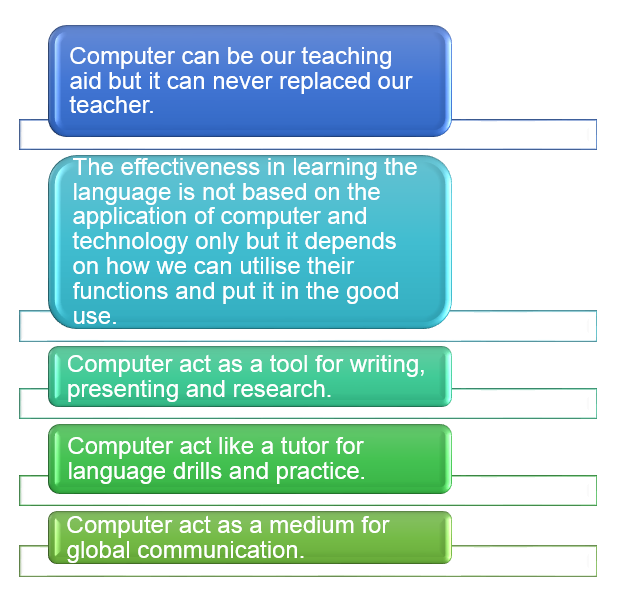
Based on what I have learned, computer and its applications plays an important role in engaging human to gain knowledge. It helps us to learn the language by using advanced method and tool. Not only it can use for language learning but it can apply in another area of study too. Thus, I would like to conclude of what I have gained from this topic which are:


That is all for this chapter ๐Ÿ˜Ž Do not hesitate to ask me if you have any questions. ๐Ÿ˜„

Wait for my next entry.๐Ÿ˜

Until then, be safe and take care people. ๐Ÿ’–


Close the curtains : IT Class And Course Assessments

                 ๐Ÿ˜ Assalamualaikum And Hello Beautiful Girls And Lovely Boys ๐Ÿ˜ Here we are again. So, this is the last week of  IT c...